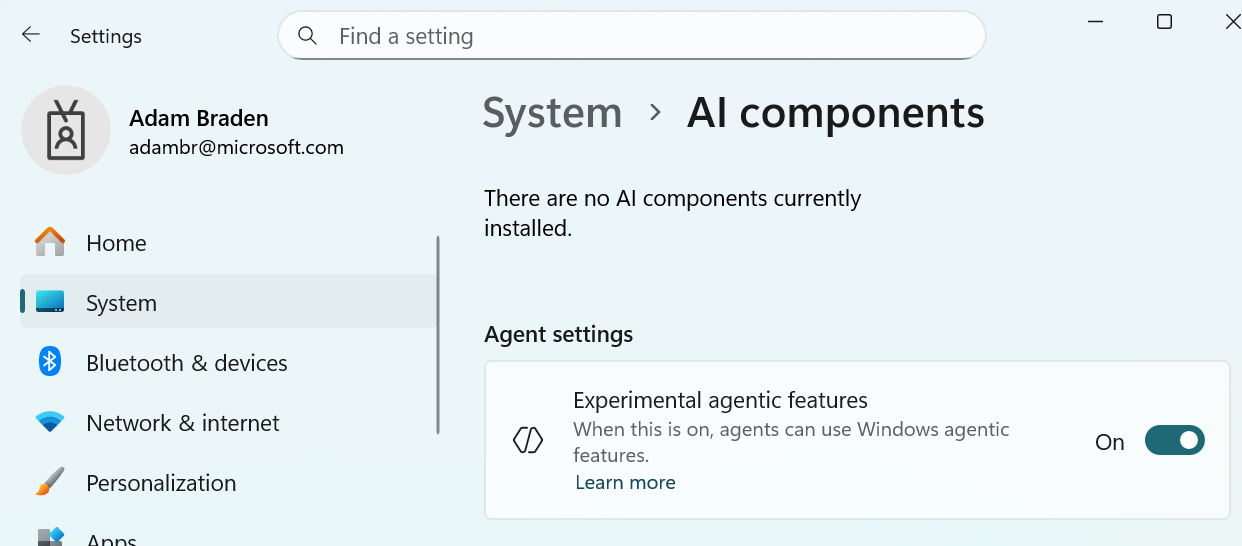
Microsoft has released a new preview version of Windows 11 to people in the Dev and Beta channels. This update includes a new setting, called ‘experimental agentic features,’ which lets users turn these features on or off directly within the Windows Settings app.
Microsoft has introduced a new setting that lets AI assistants take more control within Windows. This feature is designed to work with AI-powered apps that can automate common tasks like managing files, scheduling appointments, and sending emails. The goal is to free up your time by allowing these apps to interact with your computer – clicking, typing, and scrolling – much like a person would.
In Windows settings, there’s an option that lets agents use advanced features within Windows. This includes new capabilities like Copilot Actions for Windows, which are designed to work with this experimental technology.
Copilot Actions for Windows is an upcoming feature for the Copilot app that allows it to automate tasks for you. You can ask Copilot to do things like edit photos, rename multiple files, or finish tasks within other apps, and it will use its built-in tools to complete them automatically.
You can watch Copilot work, or let it run in the background while you continue with your own tasks – letting you multitask with Copilot’s help. To try Copilot’s new Actions feature on Windows 11, you’ll first need to enable the ‘experimental agentic features’ setting.
We don’t know yet when other apps using AI will be able to take advantage of these new features in Windows 11. Microsoft is hosting its Ignite conference this week, and we may get more details there.
Okay, so it’s been a bit of a rough week for Microsoft, at least according to the online chatter. It seems like people are worried they’re *too* focused on AI in Windows 11. Pavan Davuluri, who leads the Windows team, recently posted something about AI and got a *lot* of negative feedback. He actually had to jump in and clarify that they’re still committed to making Windows great even if you’re not into all the AI stuff. Basically, users want reassurance that the core Windows experience isn’t getting lost in the AI push.
Honestly, seeing that ‘experimental agentic features’ switch pop up so soon after all the drama didn’t sit right with me. I’m really hoping whatever they’re working on will actually make the product better, because right now it just looks a little suspicious.
A new feature allowing you to test out agentic capabilities is now available in the Windows 11 preview build 26220.7272. This update is for those in the Insider Dev and Beta Channels. It also includes a refreshed Narrator voice and a better Click To Do menu.
Read More
- The Super Mario Galaxy Movie: 50 Easter Eggs, References & Major Cameos Explained
- Sydney Sweeney’s The Housemaid 2 Sets Streaming Release Date
- 10 Best Free Games on Steam in 2026, Ranked
- Welcome to Demon School! Iruma-kun season 4 release schedule: When are new episodes on Crunchyroll?
- Why is Tech Jacket gender-swapped in Invincible season 4 and who voices her?
- Highly Anticipated Strategy RPG Finally Sets Release Date (And It’s Soon)
- The Punisher: One Last Kill Trailer Review: MCU Special Could Be a Game Changer
- Every Real Housewives Series Ranked: Worst to Best
- Forza Horizon 6 ‘Prologue’ gameplay
- Joel Kinnaman Claims ‘Peacemaker’ Was His Last Time as Rick Flag Jr. in the DCU
2025-11-18 02:09