
Players of Animal Crossing have eagerly awaited the big 3.0 update for New Horizons since it was announced last year. While it was originally planned for release on January 15th, along with a new version of the game for the Nintendo Switch, Nintendo surprised everyone by releasing the update a day early. Now, fans can start visiting Dream Islands and enjoying the new hotel features.
On January 14th, players started noticing that the 3.0 update for Animal Crossing was available. My game didn’t update automatically, but I was able to download it through the game’s settings menu. Once installed, I could immediately start playing the updated Animal Crossing: New Horizons. However, the Switch 2 version is still expected to launch on January 15th. As of now, it’s still listed as a pre-order in the Nintendo eShop, meaning Switch 2 players might have to wait until then to enjoy the new features and mouse controls.
Animal Crossing: New Horizons 3.0 Update Details

Nintendo hasn’t yet published the official details for the 3.0 update to Animal Crossing: New Horizons. However, thanks to previews and trailers, we have a good idea of what’s new. After installing the update, players can expect to find:
- New Dream/Slumber Islands with Luna
- The Resort Hotel run by Kapp’n and Family
- Max storage increase (from 5000 to 9000)
- Resetti’s Cleanup Service
- New LEGO & Nintendo Collab Items
Certain features won’t appear right away. If you’re starting a new game with the update, you’ll need to play for a bit before Kapp’n and his family open their hotel. However, things like the Slumber Islands and increased storage should be available as soon as you download the update.
New features for the Switch 2, like improved Joy-Con controls and the Megaphone function, will launch when the Switch 2 update is released. Currently, that release is expected on January 15th, though it might arrive late on January 14th depending on where you are located.
How to Check for & Manually Install Animal Crossing 3.0
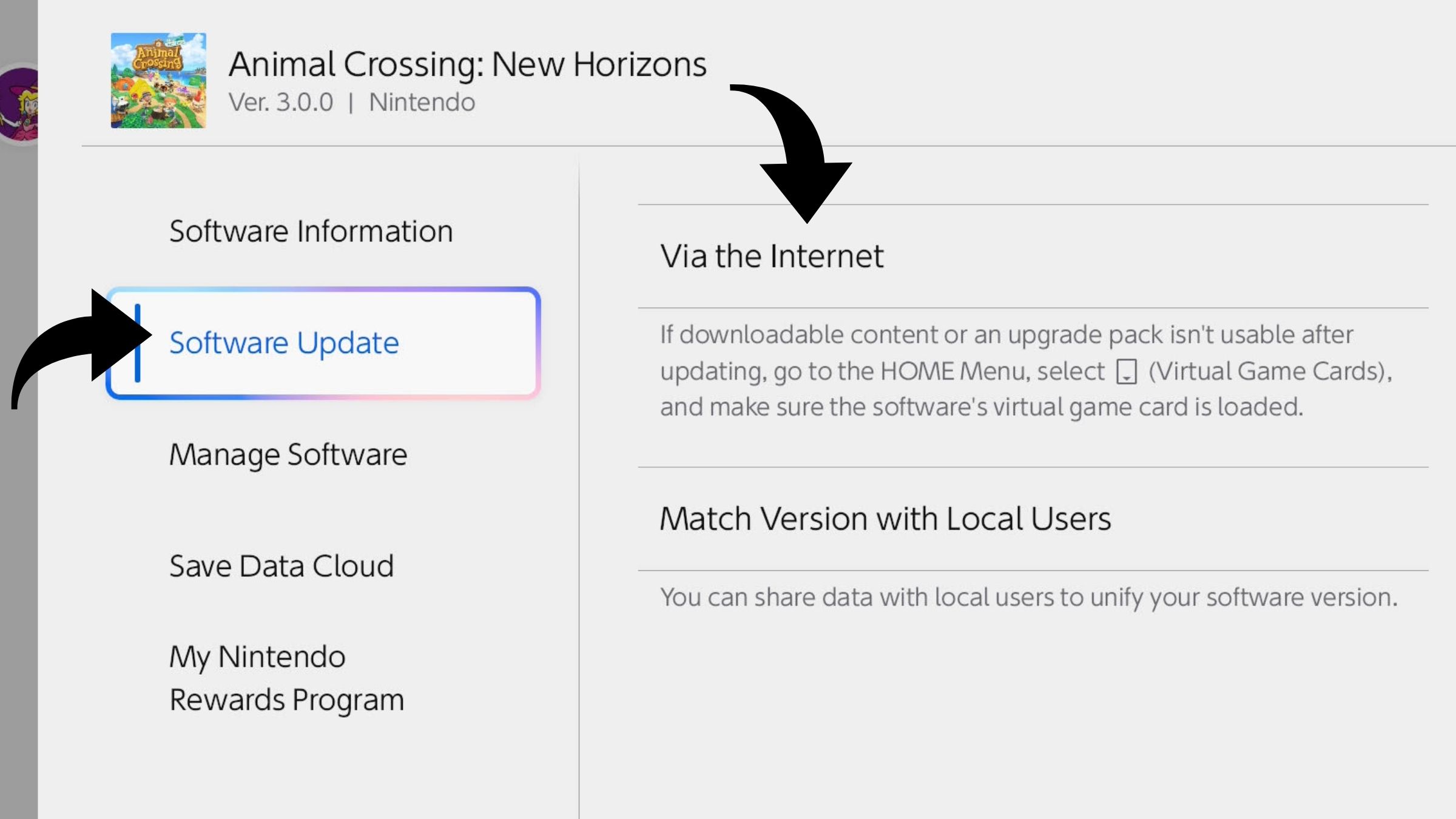
If you’re excited to play the new Animal Crossing update but it hasn’t downloaded automatically, that’s okay! You can easily check for and install it yourself with the instructions below.
To check your Animal Crossing: New Horizons version, first select the game on your Nintendo Switch or Switch 2 home screen. Then, press the + button to access the settings. Your current version number will be displayed in the top-left corner, letting you know if update 3.0 is still needed. For example, I had version 2.0.8 before I updated to 3.0.
Next, navigate to the “Software Update” section and choose “Via the Internet.” This will automatically check for and install any available updates, and should immediately begin downloading and installing the Animal Crossing: New Horizons 3.0 update.
This update is quite large, so installation might take a few minutes. After it’s finished, just start the game. You’ll receive a message saying your saved progress is being updated to the newest version, and then you can enjoy everything the 3.0 update offers!
Thrilled about getting to play the new Animal Crossing update a day early? Share your thoughts and join the discussion in the ComicBook Forum!
Read More
- The Super Mario Galaxy Movie: 50 Easter Eggs, References & Major Cameos Explained
- Sydney Sweeney’s The Housemaid 2 Sets Streaming Release Date
- 10 Best Free Games on Steam in 2026, Ranked
- Welcome to Demon School! Iruma-kun season 4 release schedule: When are new episodes on Crunchyroll?
- Why is Tech Jacket gender-swapped in Invincible season 4 and who voices her?
- Highly Anticipated Strategy RPG Finally Sets Release Date (And It’s Soon)
- The Punisher: One Last Kill Trailer Review: MCU Special Could Be a Game Changer
- Every Real Housewives Series Ranked: Worst to Best
- Forza Horizon 6 ‘Prologue’ gameplay
- Joel Kinnaman Claims ‘Peacemaker’ Was His Last Time as Rick Flag Jr. in the DCU
2026-01-14 16:40