
I received five spam emails this morning, and surprisingly, Outlook didn’t recognize any of them as junk. Outlook’s spam filtering has always been a bit weak, but this was especially frustrating. It really makes you question why Microsoft isn’t improving it, considering all the resources they have available.
Since Microsoft is integrating AI into many of its products, like Windows 11 and even Notepad, it should also focus on helping people with common frustrations. At the very least, AI could tackle the problem of spam emails, which waste time and, more seriously, can be used to defraud individuals and businesses.
Many people are reporting issues with Outlook’s spam filter, both on Reddit and on Microsoft’s official website. Some users are even suggesting artificial intelligence as a potential solution.
Microsoft likely uses some AI to filter spam, but it’s not currently using its most advanced AI technology to tackle the issue.
Copilot can already identify spam
I noticed the Copilot logo showing up in my Outlook inbox and even my junk folder. Copilot can help with things like summarizing emails, writing replies, and recapping meetings. It doesn’t appear to filter spam right now, but it made me wonder if it could in the future.
I tested Copilot’s ability to detect spam by sending it screenshots of my inbox and junk mail. I was surprised to find that it not only correctly identified spam, but also found some real emails that had been mistakenly marked as junk.
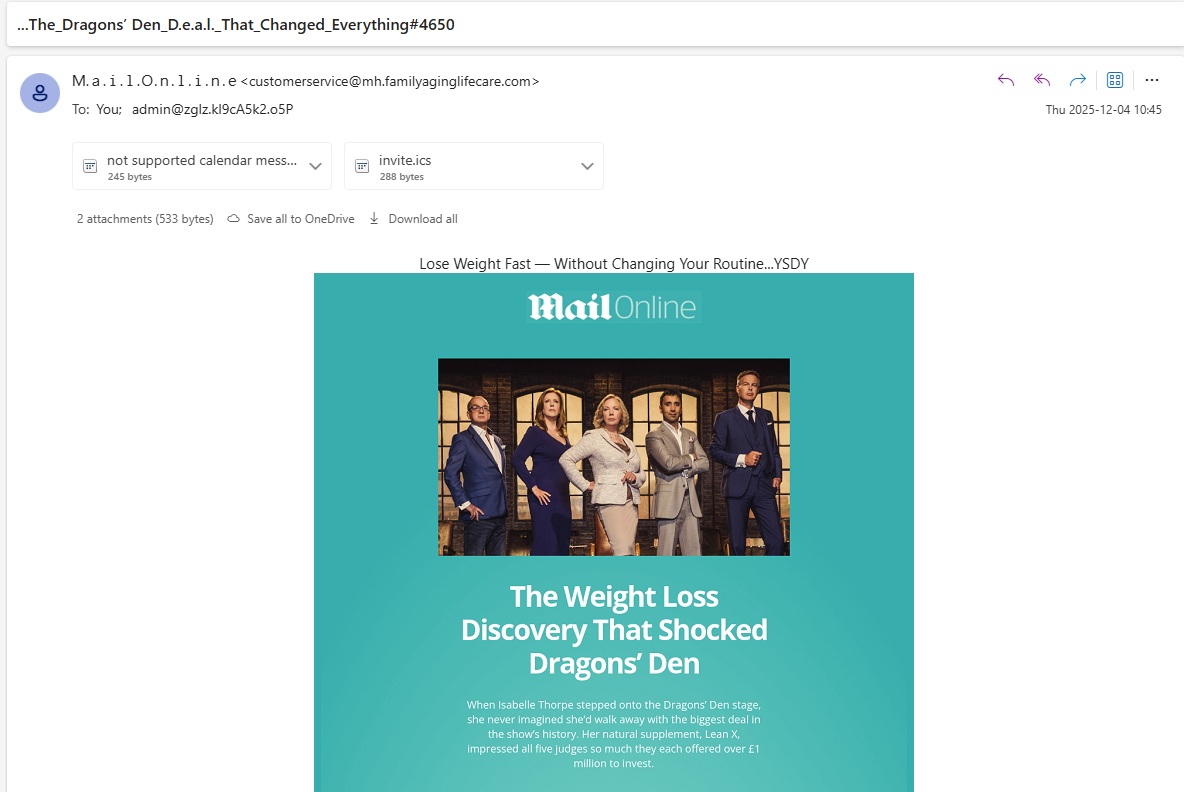
As an analyst, I found Copilot couldn’t directly access and analyze my inbox – understandable, given I’d only provided screenshots. To push its capabilities, I took a screenshot of a clearly spam email that had actually gotten past Outlook’s filters, to see how Copilot would handle it.
Copilot stated that the email is very likely spam and probably an attempt to steal your information. It then explained the reasons for this assessment.
- Sender address: customerservice@mh.familyaginglifecare.com
- This domain has no connection to MailOnline, Dragons’ Den, or any reputable weight loss brand. It’s a random, misleading domain trying to look official.
- Subject line: …The_Dragons’_Den_D.e.a.l._That_Changed_Everything#4650
- The use of underscores, ellipses, and hashtags is classic spam formatting — designed to bypass filters.
- Recipient address: admin@zglz.kI9cA5k2.o5P
- That’s not a normal email address format. It looks auto-generated or spoofed.
- Attachments:
- A calendar invite (invite.ics) and a “not supported calendar message” — both are suspicious. Spammers often use .ics files to sneak in malicious links or auto-schedule scam calls.
- Body content:
- Claims that all five Dragons offered £1 million for a supplement called “Lean X” — this is a fabricated story. There’s no record of such a deal on Dragons’ Den, and these kinds of fake endorsements are common in weight loss scams.
- Brand misuse:
- The email uses the MailOnline logo and references a popular TV show to build false credibility. That’s a known tactic in spam campaigns.
Most of us probably glanced at the email subject line and image and instantly knew it was spam. Microsoft Copilot agreed – it identified the email as junk. However, Outlook still delivered it directly to my inbox, mixed in with messages from people I actually know.
However, Copilot isn’t just about finding spam. It can also help recover important emails that were accidentally marked as junk. When I showed it a picture of my spam folder, it accurately identified two emails that should have been in my inbox.
I was really impressed Copilot understood I’m a football coach and used that to explain why an email from Craig Roh wasn’t spam. Roh regularly sends coaching advice, and I’ve subscribed to his updates. Copilot figured the email probably looked like spam because of how it was formatted for a large audience.
I’d expect this kind of functionality from a tool built into Outlook. Since I use Copilot regularly, Microsoft already has a good understanding of my preferences. Over time, the spam filtering should get better as I continue using Microsoft’s AI features and as Copilot learns about new scams and unwanted messages through its web connection.
Read More
- The Super Mario Galaxy Movie: 50 Easter Eggs, References & Major Cameos Explained
- Surprise Isekai Anime Confirms Season 2 With New Crunchyroll Streaming Release
- 10 Best Free Games on Steam in 2026, Ranked
- Preview: Sword Art Online Returns to PS5 as a Darker Open World Action RPG This Summer
- Skate 4 – Manny Go Round Goals Guide | All of the Above Sequence
- The Punisher: One Last Kill Trailer Review: MCU Special Could Be a Game Changer
- The Super Mario Galaxy Movie Is An Amusing Sequel (And an Improvement) [Review]
- Why is Tech Jacket gender-swapped in Invincible season 4 and who voices her?
- All 13 Smash Bros. Characters in the Super Mario Galaxy Movie
- Best coins for today
2025-12-04 16:10