
The Microsoft Teams team had a productive holiday season. They published a blog post on New Year’s Eve highlighting all the new features added to Microsoft Teams in December.
As a researcher, I’ve been looking at the recent updates to Teams, and they’re quite varied. They include things like the ability to detach key Teams features into separate windows, and importantly, support for recording calls – even at the queue level – using tools from other software vendors.
Microsoft revealed updates including enhanced security, tools for frontline employees, and a range of new devices compatible with Microsoft Teams.
While the updates in December are fairly minor compared to changes made in other months of 2025, they finish off a year of significant improvements to the platform.
Kerry Perez Heffernan, who leads product marketing for Microsoft Teams, recently shared details about the latest updates. The following information comes directly from her, and I’ve noted a few of the features I’m most excited about.
Chat and Collaboration
- Pop out your core Teams functions into a new window
- Joining a private team by code now requires owner approval
You can now open Teams chats, calls, calendar events, and other activities in their own windows. This makes it simpler to work on multiple things at once, as you won’t need to switch between different sections within the Teams app.
As a tech person, I’m really liking this update! It’s now so much easier to juggle different things within Teams. I can finally check my call history *while* I’m browsing my chats, which is a huge time-saver. The best part is that everything opens in separate windows, so I can snap them to my screen and resize them however I want – it’s a really flexible setup.
Meetings, Webinars, and town halls
- Enhancements to Interpreter and multilingual meeting experience
With the Interpreter feature turned on in Teams, the app can now automatically recognize and adjust to changes in the language being spoken. This means Interpreter, live captions, and live transcription will all update accordingly.
This will simplify things for those who use interpreters and work in multilingual meetings, reducing the number of steps required.
Teams now displays a “preparing” message while the Interpreter feature is starting up. This lets people in the meeting know when it’s ready to use and they can begin speaking.
Teams Phone
- Microsoft 365 Copilot chat in Calls app post-calling experience – Generally available
- Compliance Recording ISV Support for Call Queues in Microsoft Teams Phone
As a researcher, I’ve been exploring the latest updates to Microsoft 365 Copilot Chat, and I’m excited to share that it can now automatically summarize meetings, pinpoint the most important discussion points, and even suggest follow-up tasks. While Teams previously offered some similar functionality, this new experience leverages the power of Copilot Chat directly after calls, making it a much more integrated and intelligent solution.
Adding compliance recording for third-party software directly to call queues should make things easier for administrators. Previously, Teams recording settings had to be adjusted for each user individually, which was time-consuming when applying them across an organization.
Fundamentals and Security
- Tenant-Owned Domain Impersonation Protection for Teams Messaging
Teams now has a new security feature that detects when someone from outside your organization is using an email address that looks like it’s from within your company. This helps prevent attackers from tricking people into giving away private information through phishing scams. The update aims to better protect more users from these types of attacks.
Frontline Worker Solutions
- Frontline Hub
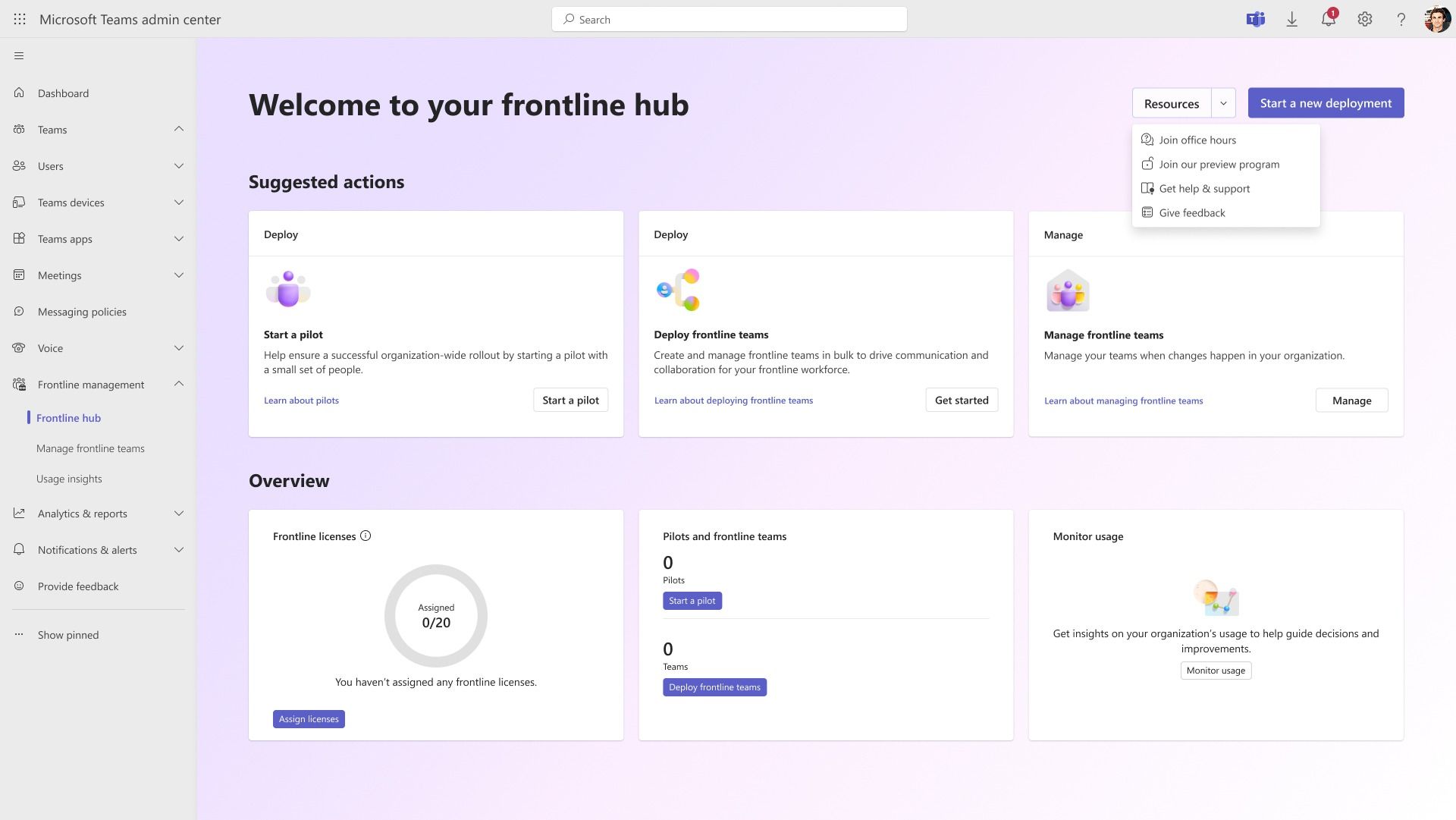
I’ve noticed a new feature for IT administrators – they can now handle all things related to Teams for frontline workers from one central location. It’s integrated right into the Teams Admin Center, and it actually learns how you work to suggest helpful things. It seems designed to make managing those Teams experiences much easier.
Certified for Teams Devices
Alongside the latest Teams updates, a range of new devices designed to work seamlessly with Teams are now available.
- EPOS IMPACT 500 MS UC ANC WL USB-C+A Headset
- EPOS IMPACT 400 ANC Headset
- Lenovo Webcams: FHD, QHD and 4K Pro
- Lenovo Dual-mode Wireless ANC Headset 6550 (USB-A and USB-C)
- The Yealink MVC S90
- The Yealink S50
- The Yealink MVC S40
Teams-certified devices have been tested to meet Microsoft’s standards for quality, dependability, and seamless integration with Teams. Microsoft evaluates things like sound and video clarity, how easily the device can be managed, and its security features to ensure certification.

Need a last-minute gift or want to plan ahead for 2026? An Amazon eGift Card is a great option. You can easily choose an amount from $5 to $2,000, making it perfect for any occasion, big or small.
With Amazon eGift Cards, you can choose from a variety of designs, add a custom message, and schedule delivery for a special date. Plus, the gift card balance never expires.
Read More
- Gold Rate Forecast
- Dune 3 Gets the Huge Update Fans Have Been Waiting For
- Every Creepy Clown in American Horror Story Ranked
- Antiferromagnetic Oscillators: Unlocking Stable Spin Dynamics
- Hazbin Hotel Secretly Suggests Vox Helped Create One of the Most Infamous Cults in History
- 22 actors who were almost James Bond – and why they missed out on playing 007
- 5 Weakest Akatsuki Members in Naruto, Ranked
- Jack Osbourne Shares Heartbreaking Tribute to Late Dad Ozzy Osbourne
- Dungeon Stalkers to end service on June 9
- Disney Promotes Thomas Mazloum To Lead Parks and Experiences Division As Josh D’Amaro Prepares To Become CEO
2026-01-01 19:40